
Ranking on Google or Bing is no longer the only way people discover your website. AI-powered search tools can also reference your content when answering questions. But how do you know whether your articles are actually being cited?
That’s where the Bing AI Performance Report comes in.
Available through Bing Webmaster Tools, this free report helps website owners see how often their pages are cited in supported AI-generated answers, which pages are referenced, and what topics are associated with those citations.
In this guide, you’ll learn how to access the report, understand its metrics, find useful content opportunities, and avoid misinterpreting AI citation data.
Table of Contents
What Is the Bing AI Performance Report?
The Bing AI Performance Report is a feature inside Bing Webmaster Tools that measures how often a website’s content is visibly cited in AI-generated answers across supported Microsoft AI experiences.
Microsoft introduced the report in February 2026 and expanded its capabilities in June.
It covers citation activity from:
- Microsoft Copilot
- AI-generated summaries in Bing
- Selected partner AI integrations
The report helps answer several practical questions:
- Is my website being cited in AI-generated answers?
- Which of my pages receive citations?
- What subjects are associated with those citations?
- Is my citation activity increasing or decreasing?
- How does my citation presence compare within a particular grounding query?
Important: The report does not measure all AI assistants on the internet. It is not a comprehensive tracker for ChatGPT, Claude, Gemini, Perplexity, or every other AI-powered service.
It also doesn’t tell you how many people clicked on your website after seeing a citation.
Think of it as a tool for understanding AI citation visibility, not a replacement for traditional SEO reporting.
How to Access Bing AI Performance
You don’t need to purchase an expensive AI visibility monitoring platform to begin.
Bing Webmaster Tools is free, and its AI Performance feature is part of that service.
Step 1: Open Bing Webmaster Tools
Visit Bing Webmaster Tools and sign in with your account.
If you haven’t added your website, you can register it directly or use the option to import a verified property from Google Search Console.
Importing is convenient because it can bring your existing site verification and sitemap information into Bing.
Step 2: Select your website
After signing in, choose the website property you want to analyze.
If you manage several websites, make sure you’ve selected the correct one before reviewing the data.
Step 3: Open AI Performance
Look for AI Performance in the Bing Webmaster Tools navigation.
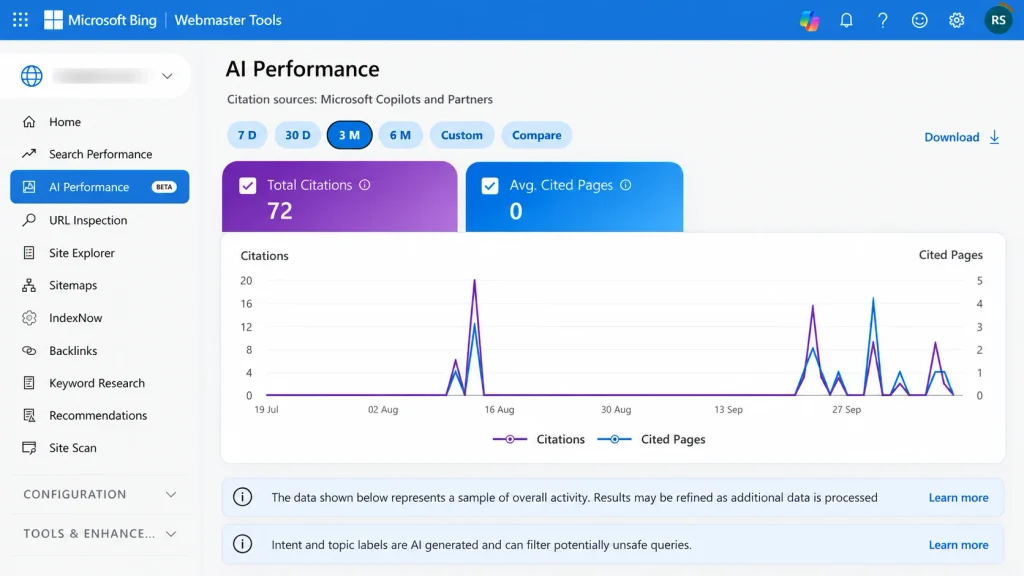
The report contains citation metrics, a visibility timeline, grounding-query information, and cited-page details.
Some newer reporting capabilities are still described by Microsoft as preview features, and available information may vary depending on the property and its citation activity.
Step 4: Choose a reporting period
Bing supports standard time windows including:
- Last 7 days
- Last 30 days
- Last 3 months
- A custom date range within the available history
For your first review, select 30 days.
This provides a practical starting point for observing patterns without focusing too heavily on daily fluctuations.
If your website is new or has very little AI citation activity, the report may be sparse.
That doesn’t automatically mean something is wrong with your website.
Understanding the Main AI Performance Metrics
The most useful part of the Bing AI Performance Report is knowing exactly what each metric means.
| Metric | What it measures | Why it matters |
|---|---|---|
| Total Citations | Visible references to your website in supported AI answers | Shows the volume of recorded citation activity |
| Average Cited Pages | Average number of unique site pages cited per day | Indicates how broadly your content appears |
| Grounding Queries | Grouped phrases associated with retrieved and cited content | Reveals themes linked to citations |
| Cited Pages | Individual URLs receiving citations | Identifies which articles are being referenced |
| Citation Trends | Changes in citation volume over time | Helps observe emerging patterns |
Let’s look at these in practical terms.
Total Citations
Total Citations measures how many times your website’s content was visibly referenced in supported AI answers during the selected period.
Suppose your website publishes articles about solar panels, energy-efficient appliances, and home electricity savings.
If an AI-generated answer cites one of those articles as a source, that reference may contribute to your citation total.
A higher number indicates more recorded citations, but it does not necessarily mean higher search rankings, greater authority, or more website visitors.
Average Cited Pages
This metric shows the average number of unique pages from your website cited per day.
It helps distinguish between a website receiving citations mainly from one successful article and another whose citations are spread across several pages.
However, it isn’t an authority score. A site with fewer cited pages may still publish exceptionally useful information.
Grounding Queries
Grounding queries are especially interesting for content strategy.
They represent the phrases associated with information that an AI system retrieved and cited while generating answers.
For example, a website about renewable energy might see grouped phrases such as:
- Solar panels
- Home solar installation
- Solar energy efficiency
These are illustrative examples, not actual reporting data for any particular website.
Grounding queries are not necessarily the exact questions users typed into an AI assistant.
Microsoft groups and summarizes this information, so the phrases may be broader than the original user requests.
They can still help identify subjects where your website is appearing in AI-generated answers.
Cited Pages
The Pages section identifies the specific website URLs that receive citations.
This is valuable because it shows which pieces of content are attracting recorded AI references.
If your website has 100 published articles but only a handful receive citations, you can study those pages to understand their subject matter, structure, and usefulness.
Don’t assume the uncited articles are poor quality. They may address topics with lower demand or simply have limited exposure within the supported AI experiences.
How to Analyze Your AI Citations: A Practical Workflow
Instead of reviewing the dashboard without a plan, use this repeatable workflow.
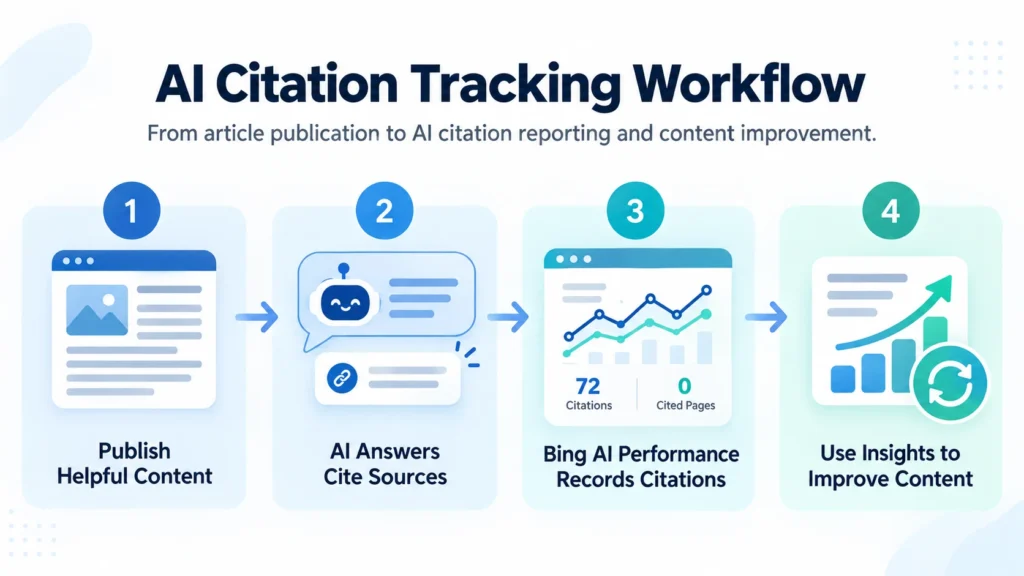
Step 1: Establish a baseline
Open the report and choose the last 30 days.
Record your Total Citations, Average Cited Pages, and overall citation trend.
These figures become your starting reference for future reviews.
Avoid making decisions from a single day’s activity.
Step 2: Identify your cited articles
Open the Pages section and look at which URLs appear most often.
Ask:
- Which subjects do these articles cover?
- Are they beginner guides, tutorials, comparisons, or research-based explanations?
- Do they provide direct answers to specific questions?
- Are the facts and supporting references current?
Look for consistent patterns rather than assuming one formatting choice caused the citations.
Step 3: Review grounding queries
Open the Grounding Queries section and examine the phrases associated with your content.
Bing also supports mapping between grounding queries and cited pages, making it possible to examine the relationship in either direction.
For example, you can inspect a grounding query and identify which pages were cited for it, or select a page to examine its associated grounding queries.
This is where the report becomes especially useful for editorial planning.
A single subject might deserve a detailed guide, a comparison article, or a supporting tutorial.
Step 4: Export the data
Bing provides downloadable report data in CSV and Excel formats.
You can export grounding-query information, page-level citation counts, and available time-series metrics for closer examination.
Keep your exports organized by date so you can review changes over time.
Step 5: Compare with traditional search performance
Open Bing’s regular Search Performance report alongside AI Performance.
Compare which pages attract organic search activity and which receive AI citations.
You may discover that an article attracts search impressions without appearing frequently in AI answers, or that another receives citations without generating substantial organic traffic.
Those signals describe different kinds of visibility.
They should be analyzed together, not treated as interchangeable.
Four Newer Features: Intents, Topics, Citation Share, and Compare
In June 2026, Microsoft introduced four additional capabilities in preview to help website owners understand citation data more deeply.
1. Intents
Intents classifies grounding queries based on their likely purpose.
Categories can include Informational, Commercial, Navigational, Research, Comparison, Learn and Solve, and others.
For a business software website, this can help distinguish research-oriented citations from those associated with commercial investigation.
For example, someone researching the differences between two CRM platforms has different needs from someone learning what CRM means.
Microsoft uses automated classification, so intent labels aren’t always perfect.
2. Topics
Topics groups related grounding queries into broader subject areas.
Several queries about residential solar technology might be grouped under Solar Energy.
This makes it easier to analyze thematic visibility instead of treating every phrase independently.
For publishers building topic clusters, this is a particularly useful way to review broader subject coverage.
3. Citation Share
Citation Share shows your website’s proportion of citations within the reported citation space for a specific grounding query.
This provides context beyond the raw number of citations.
But remember three limitations:
- It does not reveal every competing website.
- It is not a search ranking or authority score.
- It does not represent market share, traffic share, or the probability of being cited.
Use it to observe relative citation presence, not to make exaggerated claims about dominating AI search.
4. Compare
Compare lets you view citation activity across different time periods.
For example, you can compare the last 30 days with the preceding 30 days or select custom ranges.
This can help monitor changes after major content updates.
However, seeing citation activity rise after updating an article does not prove the update caused the increase.
Demand, model changes, other websites, and reporting behavior may also influence the result.
What If Bing Shows Zero AI Citations?
If you’re operating a new blog or a relatively small website, you might open AI Performance and find no meaningful data.
That can be frustrating, especially when your website is already indexed by Bing.
But zero visible citations and zero opportunities are not the same thing.
There are several possible explanations.
Your website has limited citation activity
Bing’s data is aggregated and sampled.
Microsoft explains that very low or infrequent citation activity might not appear in the report.
Consequently, an empty report is not proof that your website has never been referenced by an AI system.
Your content isn’t relevant to common questions
Some published topics naturally attract more AI-assisted research than others.
An article addressing a specific technical question may be more relevant to certain AI-generated answers than a personal announcement or general opinion piece.
That doesn’t make one type of content universally superior. It simply means the potential uses differ.
Your website is not fully discoverable
Check whether your important articles are accessible and eligible for indexing.
Use Bing Webmaster Tools to review URL indexing, sitemap processing, and crawl problems.
If a published article is intentionally marked noindex, don’t expect it to behave like an ordinary indexable search result.
Your content may need improvement
Review whether your articles provide enough useful detail to answer their intended questions.
Look for outdated claims, missing explanations, confusing headings, and unsupported statements.
Adding more keywords alone isn’t a solution.
Most importantly, don’t interpret zero AI citations as a manual penalty or evidence that your website has failed SEO.
How to Improve Your Website’s AI Search Visibility
There’s no reliable shortcut that guarantees citations in AI-generated answers.
The strongest starting point is the same foundation used for quality search content: useful information, accessible pages, clear organization, and credible evidence.
Answer specific questions clearly
If an article targets the question “How does a smart thermostat save energy?”, provide a straightforward explanation near the beginning.
Then expand with practical examples, limitations, and relevant supporting details.
Readers shouldn’t have to search through several introductory paragraphs to find the answer.
Use descriptive headings
Headings should communicate what each section actually covers.
For example:
- How Much Energy Can a Smart Thermostat Save?
- Smart Thermostat Installation Requirements
- When a Smart Thermostat May Not Save Money
These headings are more useful than vague titles such as “Benefits” or “Things to Know.”
Support important claims
Use trustworthy references for statistics, technical specifications, financial estimates, and health-related claims.
Whenever possible, include original observations, demonstrations, and comparisons.
Don’t invent personal testing results or unsupported performance figures.
Keep articles current
Review content when software interfaces, product prices, regulations, or technical recommendations change.
For software tutorials, check that instructions still match the product’s current behavior.
Build relevant internal links
Help visitors navigate between useful, related articles.
For example, a guide to Nano Banana image prompts can link to more specific tutorials on image editing, prompt refinement, and product-image workflows.
Internal links should help readers continue learning, not simply connect unrelated articles to increase link counts.
Maintain technical SEO
Make sure important pages are indexable, your XML sitemap is valid, and your site works properly on mobile devices.
If you use WordPress with Rank Math, the plugin can also support IndexNow notifications for updated URLs.
These measures improve content discovery and maintenance, but none guarantees an AI citation.
Bing AI Performance vs. Google Search Console
Should you use Bing AI Performance instead of Google Search Console?
No. Both tools provide useful information, but they measure different things.
As of August 31, 2026, Google has made a separate generative AI performance report available worldwide for eligible sites with sufficient reporting data.
Here’s how the tools compare:
| Feature | Bing AI Performance | Google Search Console |
|---|---|---|
| Main focus | Citations in supported AI answers | Google search performance and generative AI impressions |
| AI experiences | Copilot, Bing AI summaries, selected partners | Google AI Overviews and AI Mode |
| Page-level reporting | Cited URLs | URLs receiving AI-feature impressions |
| Query-related reporting | Grouped grounding queries | The generative AI report emphasizes page, country, date, and device dimensions |
| Primary measurement | Visible citation activity | Impressions and conventional search-performance metrics |
| Complete AI ecosystem coverage | No | No |
Google’s generative AI report measures how often links to your site are shown in its supported AI search features.
Bing’s AI Performance Report instead counts recorded citations across its supported AI experiences.
These metrics have different definitions and should not be added together.
For a complete picture, continue using conventional organic search reports, AI-specific reporting where available, and your website analytics.
Frequently Asked Questions
Is Bing AI Performance free?
Yes. Bing AI Performance is included within Bing Webmaster Tools, Microsoft’s free platform for verified website owners.
Does Bing AI Performance show ChatGPT citations?
It reports citation activity across Microsoft Copilot, Bing AI-generated summaries, and selected partner experiences. It should not be treated as a complete tracker for ChatGPT or other independently operated AI services.
Are AI citations the same as website visits?
No. A citation means your content was visibly referenced in a supported AI-generated answer. It doesn’t establish that somebody clicked the link or visited your website.
How often is Bing AI Performance updated?
Microsoft says the data is refreshed daily with a processing delay. The report is based on aggregated, sampled activity rather than a complete log of every AI-generated answer.
Can I see the exact questions people asked?
Not through the grounding-query data. Bing displays grouped phrases associated with cited content rather than full individual prompts or complete conversations.
Will improving my articles guarantee more AI citations?
No. Better content may make your website more useful and relevant, but citations also depend on user questions, retrieval behavior, competing sources, and changes to AI systems.
Final Thoughts
The Bing AI Performance Report offers website owners a practical way to see how their content appears in supported AI-generated answers.
Its value isn’t just the number of citations. The combination of cited pages, grounding queries, topic groupings, intent labels, and comparison tools can provide useful information for planning and improving content.
Start with a 30-day baseline, identify the pages associated with citations, review the relevant topics, and compare those findings with your traditional SEO performance.
And if your report is empty, don’t panic. Confirm that your website is indexable, continue publishing genuinely useful content, and monitor the data over time.
The objective isn’t to chase an AI citation counter. It’s to build a website that people and search systems have good reasons to reference.