
You explain how to handle a customer request. Your colleague understands it, and the task gets done. A month later, someone else takes over, misses a step, and asks you to explain everything again. It isn’t a complicated problem, but the interruptions keep adding up.
A standard operating procedure, usually called an SOP, gives people a shared way to complete repeatable work. The useful kind doesn’t read like a policy manual. It tells someone what starts the task, what to do, how to check the result, and where to go when something unusual happens.
If you’re learning how to write a standard operating procedure, the goal is not to document everything your business does. Start with one task, write instructions someone can follow, and improve them using feedback from the people doing the work.
Table of Contents
What Is an SOP and When Do You Need One?
An SOP is a documented set of steps for performing a recurring activity consistently. Businesses use them for customer onboarding, invoice handling, inventory checks, publishing content, routine quality checks, and many other tasks.
An SOP works best when mistakes have a cost, several people need to perform the same activity, or a task happens often enough that people shouldn’t have to invent the steps each time. The US EPA guidance on preparing SOPs is written for regulated quality systems, but its attention to purpose, procedural detail, review, and document control offers a useful model for ordinary business processes too.
Not every activity needs a formal document. A quick personal reminder may be enough for an occasional task. An SOP becomes more valuable when another person must be able to perform the work correctly without the original employee standing nearby.
How to Write a Standard Operating Procedure Step by Step
Step 1. Choose one repeatable process
Pick a task that has a clear beginning and end. “Manage customer support” is too broad. “Respond to an order-status request” is more manageable because you can identify the trigger and expected result.
Prefer a process that actually causes confusion today. Ask what goes wrong, how frequently it happens, and who would benefit if the instructions were clearer. That creates a stronger reason for writing the SOP than simply filling a documentation folder.
Step 2. Observe the process before documenting it
Speak with the person who currently completes the task. Ask them to walk through a real example, including the steps they usually skip when explaining it from memory. Watch for checks, handoffs, and small decisions that aren’t obvious to a newcomer.
Also ask what happens when required information is missing. A good SOP should cover the most common exception, not only the ideal path. Otherwise it may fail during the first unusual request.
Step 3. Write the purpose, trigger, and result
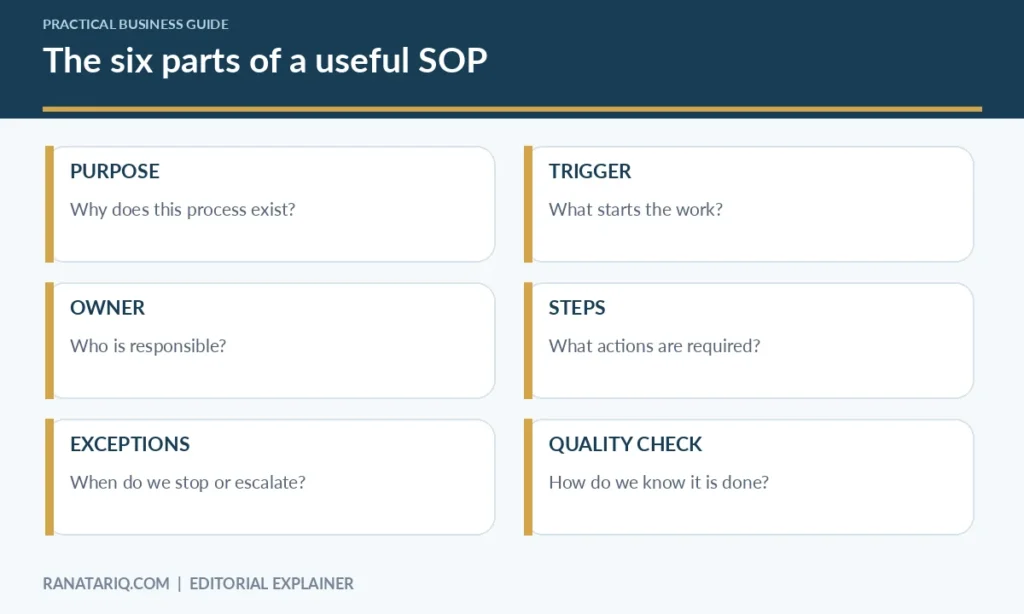
Begin with three short statements. The purpose explains why the process exists. The trigger describes what starts it. The result says what finished work should look like.
For an order-status request, the purpose might be to provide an accurate update without exposing private order information. The trigger is a customer asking where an order is. The result is a verified status response recorded in the support system.
These details keep the procedure focused. They also make it easier to know whether the team followed the SOP successfully.
Step 4. Identify who does what
Name the role responsible for the task and any approval or escalation owner. Avoid writing “the team checks the order” if nobody can tell who that means.
You can assign responsibilities to roles rather than specific employees. “Support representative” survives staffing changes better than a person’s name. If an approval step requires a manager, identify the manager’s role and what information they need to review.
Step 5. Write numbered actions in normal language
Use one clear action per step wherever practical. Write “Open the order record and confirm the order number” rather than “Verify all applicable order information in the relevant internal systems.” The first version tells the reader what to do.
Be specific about where the information lives, which fields matter, and what action follows. Don’t fill the SOP with obvious details that make a five-minute process look like a training manual.
Step 6. Add decisions and exceptions
Some tasks need conditional steps. If a tracking status is unavailable, the employee may need to contact the carrier or escalate the case. If the customer cannot verify their identity, the employee must not disclose protected order details.
Use an “If this happens, do this” table when several exceptions occur. Keep high-risk approvals separate from ordinary actions so employees aren’t encouraged to improvise.
Step 7. Define a quality check
A task isn’t complete just because every action has been clicked. Explain what must be true before the work can be marked finished.
For order support, the correct customer record must have been checked, the response should match the available evidence, and the contact should be logged. A reviewer should be able to verify those outcomes without guessing.
Step 8. Ask someone else to follow it
Give the draft to a colleague who didn’t write it. Watch them complete a realistic sample without helping unless necessary. Note where they pause, ask a question, or interpret a step differently.
Revise those points, then test again. This catches the gap between what the writer thinks is obvious and what another person can actually do.
Step 9. Publish one controlled version
Choose one place where people can find the current document. Add an owner, last-reviewed date, and version number. Archive old versions clearly so employees don’t follow conflicting instructions saved in email attachments.
Review the SOP when the tool, policy, risk, or customer need changes. A calendar reminder can help, but a process change should trigger an earlier review rather than waiting for the next scheduled date.
A Simple SOP Template You Can Copy
You don’t need specialized software to start. A shared document is enough if your team can access the correct version and control edits.
| Field | What to write |
|---|---|
| SOP title | Responding to customer order-status requests |
| Owner | Customer support lead |
| Version | 1.0 |
| Last reviewed | Enter actual review date |
| Purpose | Give accurate status updates and protect customer information |
| Trigger | Customer asks about an existing order |
| Inputs | Order number, approved verification details |
| Steps | See numbered procedure |
| Exceptions | Missing record, delivery dispute, identity mismatch |
| Completion check | Status verified, customer informed, interaction logged |
Example procedure
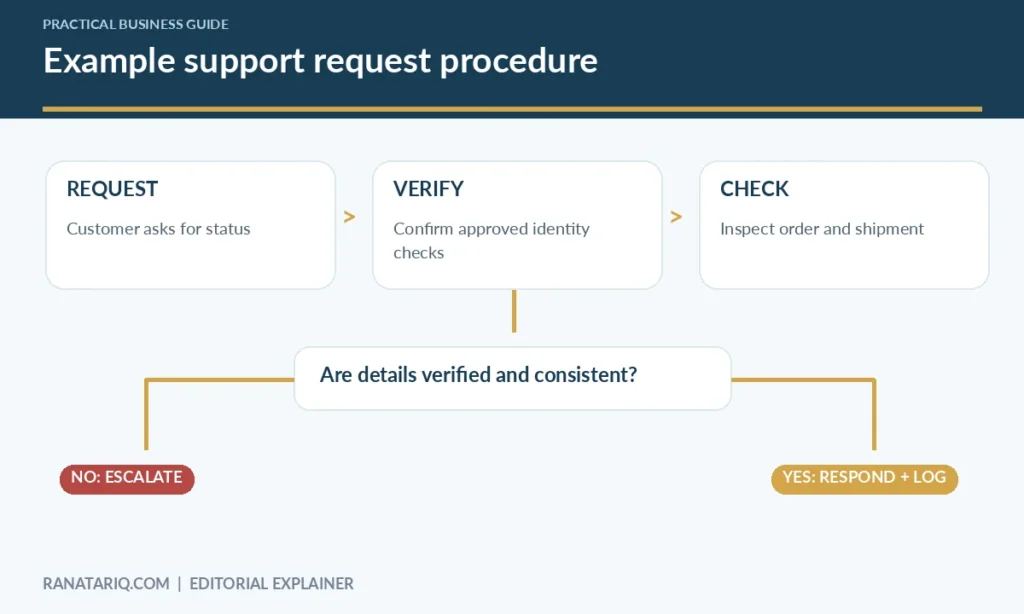
- Open the approved support application and locate the order using the reference provided.
- Follow the company’s identity-verification rule before revealing private order information.
- Check the current order and shipping statuses in the source system.
- If the records conflict, do not guess. Flag the case for review using the escalation route.
- Choose the approved response template and update it with the verified status.
- Send the response through the approved channel and save a note on the support record.
- Confirm that the customer message is recorded and any follow-up has an owner.
This is an illustrative template, not an operational policy from a real company. Adapt it to your own privacy requirements, systems, and approval rules.
Should Your SOP Be a Checklist, Flowchart, or Document?
Choose the format that matches the task. A short checklist works well for routine end-of-day checks, when people already understand the work and need to avoid omissions. Numbered instructions are better when a new employee needs to learn a sequence.
A flowchart is useful when decisions change the next action. A video or annotated screen recording can help demonstrate a complicated software interface, but it should not be the only place where essential exceptions and responsibilities are documented.
| Process type | Useful SOP format |
|---|---|
| Predictable task with few steps | Checklist |
| New employee needs context | Numbered guide |
| Several decision branches | Flowchart with clear conditions |
| Software process with tricky settings | Guide plus current screenshots |
| High-impact action | Written procedure with explicit approval controls |
Accessibility matters too. Use meaningful headings, readable text, and text descriptions for diagrams. When your SOP uses images, the W3C guidance on image alternatives explains why important information should not be available only in an illustration.
Example SOP for Publishing a WordPress Article
A content publishing process is a good example because it includes creation, review, checks, and a final release. It can also go wrong when responsibility for links, images, or metadata is unclear.
Preparation
Confirm that the draft has a clear audience and search intent. Check factual claims and links against reliable sources. Make sure the title, headings, images, and captions match what the article actually says.
WordPress setup
Create the post using the appropriate category and a readable permalink. Add the featured image, internal links, and the necessary SEO metadata. Review the article in both desktop and mobile layouts.
Approval and publishing
Have the assigned editor check the preview. Resolve broken links, missing alt text, duplicate headings, or layout problems. Publish only after the reviewer records approval, then verify the live URL.
This workflow can be managed as a repeatable checklist. If the team later adds automation, keep the editorial approval step in place rather than assuming a successful upload means the content is ready.
Where Automation Helps With SOPs
A documented procedure and an automated workflow solve related but different problems. The SOP explains what should happen. Automation can carry out some of those steps, remind people about deadlines, or route an item to the next owner.
For instance, an automated form could capture a customer’s request and assign it to the right team. The SOP would still define how that request should be verified, answered, and escalated. If incoming messages require interpretation, an AI-assisted step may help, but it should not replace controls on sensitive decisions.
A standard operating procedure is also useful before automation because it exposes the steps that are stable enough to automate. Trying to automate a process nobody can describe usually leads to confusing exceptions and repeated fixes.
Common SOP Mistakes and How to Fix Them
The most common problem is writing for management rather than the person doing the task. Long explanations of company philosophy won’t help someone who needs to complete a return request correctly. Put the actual procedure where the reader can find it quickly.
Another mistake is documenting only the ideal case. Add practical responses for missing data, unexpected results, and unavailable systems. If the correct response is to stop and ask for help, write that clearly.
Finally, avoid saving five slightly different versions across different drives. Choose a single current version, assign ownership, and make reviews part of normal operations. An outdated SOP can be worse than no SOP because it gives people confidence in incorrect instructions.
Frequently Asked Questions
What are the basic parts of an SOP?
A useful SOP usually identifies the purpose, trigger, owner, required inputs, numbered steps, exceptions, quality check, and review information. The exact format can be shorter for simple, low-risk tasks.
How long should an SOP be?
As long as needed to make the task repeatable and safe, but no longer. A simple check might fit on one page. A complex process may need separate procedures instead of one oversized document.
Who should write an SOP?
The person who understands the task should help document it, and another person should test the instructions. A process owner should approve and maintain the final version.
Is an SOP the same as a checklist?
No. A checklist is one possible format for an SOP. An SOP can also explain roles, decisions, exceptions, and quality standards that a quick checklist doesn’t cover.
How often should SOPs be reviewed?
Review them when tools, policies, responsibilities, or risks change. Also set a reasonable routine review schedule for processes that otherwise remain stable.
Final Thoughts
Learning how to write a standard operating procedure starts with watching real work, not choosing a template. Write instructions that another person can carry out, include the common exceptions, and test the result before calling it finished.
One clear, maintained SOP for a task that regularly causes mistakes is more valuable than a library of documents nobody opens. Start there and build your documentation around problems worth solving.