
A spreadsheet can keep your customer contacts organized when your business is small. You can sort names, add notes, and create a column for the date of your next follow-up. If you’re the only person talking to customers, that might be everything you need.
The problems tend to appear gradually. Two people contact the same prospect. Someone forgets to update a deal. A customer replies to an old email, but the details are buried in another person’s inbox. At that point, the real question isn’t whether spreadsheets are good software. It’s whether your current system can still support the way your team works.
This CRM vs spreadsheets for small business guide explains where spreadsheets are enough, what a customer relationship management system adds, and how to move without creating a data mess.
Table of Contents
CRM vs Spreadsheets for Small Business at a Glance
A spreadsheet stores information in rows and columns. A CRM, short for customer relationship management software, connects information about people, companies, conversations, deals, and follow-up activities.
| Question | Shared spreadsheet | CRM |
|---|---|---|
| Can we store contact details? | Yes | Yes |
| Can multiple people update records? | Yes, with suitable sharing and permissions | Usually, with role-based team access |
| Can we track a sales pipeline? | Yes, if we build and maintain it | Often included as a core feature |
| Can we see activity history for a contact? | Only if we enter and organize it | Often attached to contact records |
| Can we automate follow-up reminders? | Possible with formulas or integrations | Often available, subject to plan and setup |
| Is setup simple? | Usually | Requires process and data configuration |
| Does it automatically improve sales? | No | No |
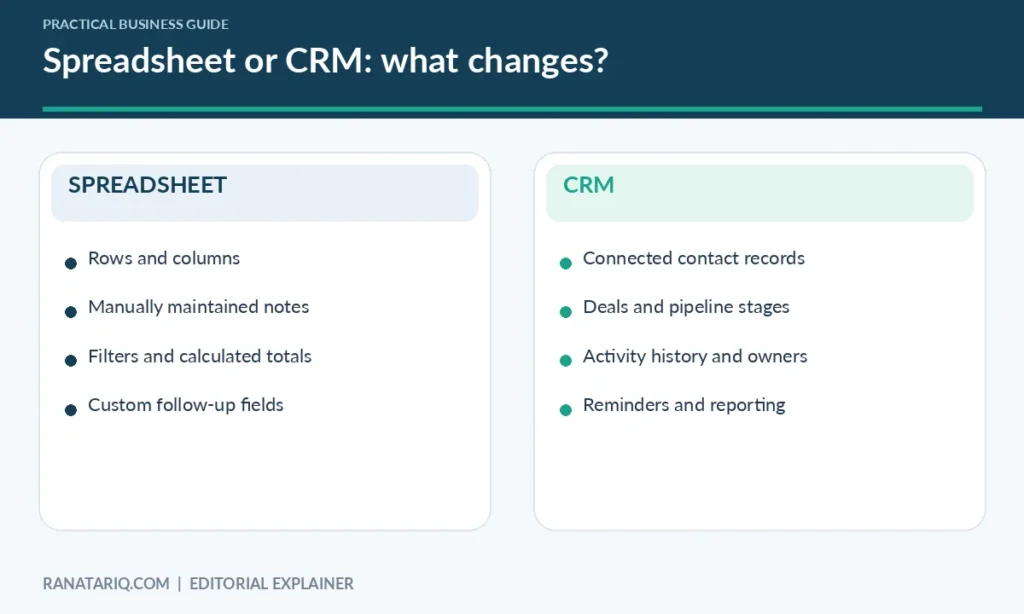
The phrase “a CRM is better” misses the point. A well-run spreadsheet is more useful than an expensive CRM that nobody updates. The choice depends on how many handoffs, conversations, and moving parts you need to manage.
What a Spreadsheet Does Well
A basic customer tracker might have eight columns: customer name, company, email, phone, lead source, status, next action, and owner. With clear rules, that can give a solo consultant or very small team a usable overview of their leads.
Spreadsheets are flexible. You can add a new column, use filters, calculate totals, and create an overview without designing a whole business system. Modern shared spreadsheets also support live collaboration. Microsoft’s Excel co-authoring documentation explains how teammates can work in the same supported workbook.
But collaboration doesn’t solve every problem. A spreadsheet doesn’t inherently know that an email belongs to a particular customer or that a promised callback was missed. Unless you add processes or integrations, someone has to maintain those relationships manually.
A starter spreadsheet worth keeping
Before buying anything, try this structure for a two-week period.
| Column | Example | Why it matters |
|---|---|---|
| Contact | Morgan Lee | Identifies the prospect |
| Company | Example Studio | Groups contacts |
| Lead source | Website inquiry | Shows how they found you |
| Stage | Proposal sent | Shows progress |
| Owner | Alex | Makes responsibility clear |
| Next action | Call about timeline | Defines the follow-up |
| Due date | Next Tuesday | Prevents forgotten tasks |
| Last contact | Last Friday | Adds context |
Those names and dates are fictional examples, not records from a real business. Use one row per opportunity if the same company can have several active deals. Give every deal a unique ID so duplicate names don’t cause confusion.
What a CRM Adds Beyond a Contact List
A CRM organizes activities around customer records instead of treating every update as an independent cell. Many products let you view a contact’s associated deals, notes, tasks, and previous interactions in one place.
For example, HubSpot documents contact management and pipeline tracking as CRM capabilities. Other vendors organize them differently, so evaluate the actual features and limitations before committing.
The main benefits are operational, not magical. A CRM can make ownership clearer, support reminders, reduce duplicate data entry through integrations, and make it easier to see stalled deals. None of those benefits happen automatically if your team doesn’t use the system consistently.
One customer, several conversations
Imagine a home remodeling business. A homeowner first requests an estimate, then phones with measurements, then emails updated photos. Three employees may be involved before a job is approved.
In a spreadsheet, they might record each interaction in notes and link to files manually. A CRM can bring those activities under the same customer record, helping the next employee understand the situation without searching several inboxes.
That shared history is often a stronger reason to adopt CRM software than the promise of a more attractive dashboard.
Six Signs You’ve Outgrown Your Spreadsheet
You don’t need to hit a particular employee or customer count to justify switching. Watch for these practical symptoms.
1. Follow-ups are missed even when someone owns them
If an overdue date sits in a cell without alerting anyone, the spreadsheet may be recording tasks rather than helping your team complete them. A CRM with task ownership and reminders could improve the process, assuming notifications are configured and reviewed.
2. Customer history is scattered across inboxes
When important context lives only in personal email accounts, someone covering for a colleague can’t easily take over. Centralizing approved customer history can help, but make sure access permissions protect sensitive information.
3. You can’t trust the current deal status
If one employee writes “interested” and another writes “likely” for the same stage, reports become unreliable. First define your stages clearly. If that isn’t enough, a CRM can enforce more consistent processes.
4. Multiple employees update the same opportunities
Shared spreadsheets can handle simultaneous editing, but ownership and handoffs may still be unclear. A CRM may provide clearer activity assignment and records of who performed particular actions.
5. Copying information is taking too much time
If your team repeatedly copies website inquiries into a spreadsheet, then into an email tool, then into a calendar, integration can become valuable. Check whether an ordinary automation would solve the problem before changing your entire customer system.
6. Reporting requires a weekly cleanup session
A sales summary should not depend on one person correcting inconsistent dates, names, and stages every Friday. Better field definitions and a CRM’s structured data model can help, but poor data discipline will still cause problems.
When You Should Keep the Spreadsheet
A CRM can be unnecessary overhead for a freelancer who works with a few ongoing clients or a shop that already has an effective order-management system. If the same person handles every contact, updates records reliably, and knows which follow-up comes next, a spreadsheet may be the right choice.
Keep it when it gives you an accurate view of the work without causing repeated mistakes. Improve permissions, backups, field names, and weekly review habits before purchasing software.
It’s also sensible to postpone migration if nobody has the time to define sales stages or clean existing records. Moving disorganized information into a CRM doesn’t make it organized.
How to Switch From a Spreadsheet to a CRM
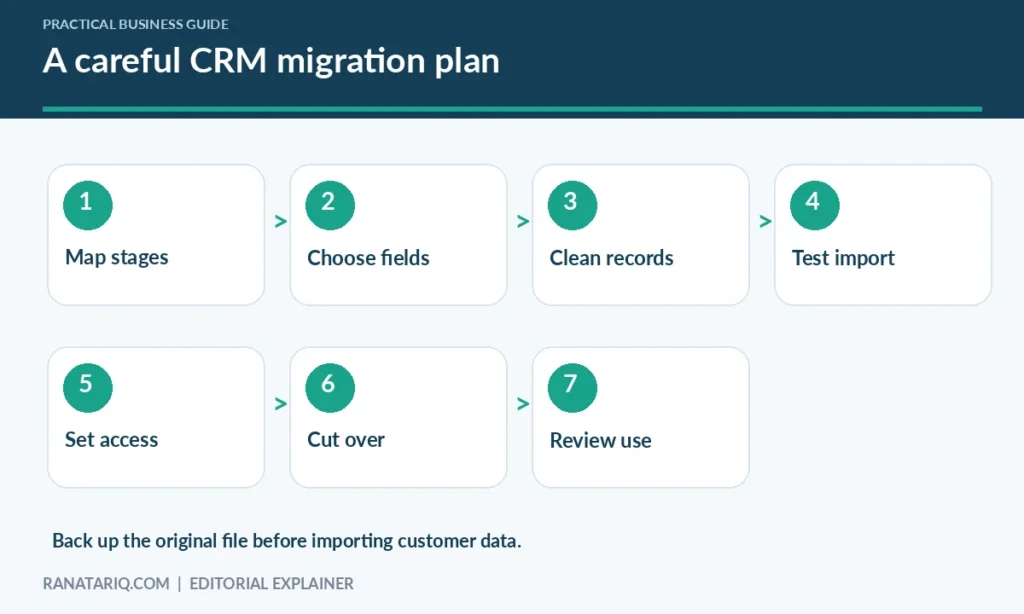
A small migration can be handled carefully without shutting down daily work. Don’t begin by importing every file you’ve ever collected.
Step 1. Define the process you’re moving
Sketch a typical customer journey from inquiry to completed sale. Use four or five meaningful stages, such as New inquiry, Qualified, Proposal sent, Won, and Lost. Write down what has to happen before a deal can change stage.
Step 2. Decide what data belongs in the CRM
Start with essential contact fields, the person responsible, deal value if relevant, current stage, and next action. Exclude unrelated personal information and old notes that your team no longer needs.
Step 3. Clean duplicate and incomplete records
Make a backup of the spreadsheet. Standardize date formats and company names, remove duplicate entries carefully, and confirm that email addresses belong to the right people. Keep the original for audit and recovery.
Step 4. Test an import with fictional or limited records
Create a small sample first, then check field mappings and relationships. Test what happens when a contact has two active deals or when two contacts work at the same company.
Step 5. Set access and ownership rules
Decide who can view, edit, export, and delete customer information. Give staff only the access they need. Record the person accountable for correcting imported records and handling duplicates.
Step 6. Run a short parallel period
For a limited time, check that both systems tell a consistent story without encouraging everyone to maintain two conflicting versions indefinitely. Choose a cutover date and communicate where future updates must happen.
Step 7. Review adoption, not only the dashboard
After a few weeks, ask whether follow-ups are completed more reliably and whether staff can find customer context faster. If your team is duplicating work, fix the workflow before adding more features.
How to Evaluate CRM Software Without Buying Too Much
Write down the tasks that cause trouble today. Then ask each vendor to show you how its product handles those exact scenarios. A generic feature checklist is less useful than watching someone create a lead, log a call, assign a next action, and retrieve the record later.
Compare export options, import quality, permissions, integrations, backup arrangements, and what happens if you cancel the subscription. Check published plans directly because prices, user limits, and features can change.
You may already have data from customer feedback forms. If that’s your problem, our n8n AI agent with Google Sheets customer feedback tutorial explains one way to organize comments before deciding whether a CRM is required.
Common Mistakes When Moving to a CRM
Buying a CRM before deciding who owns leads is a frequent mistake. The software can’t resolve conflicting responsibilities on its own. Another is importing thousands of outdated records, then asking staff to work around cluttered search results.
Be cautious about turning on every automation at once. Start with a simple reminder or assignment rule, review mistakes, and expand only when it saves genuine work. Keep privacy and data access policies ahead of convenience.
Frequently Asked Questions
Can a spreadsheet replace a CRM?
Yes, for simple contact tracking and a small number of deals. It becomes less convenient when teams need shared activity history, reliable task ownership, or more complex pipeline management.
Is a CRM worth it for a one-person business?
Sometimes, but not automatically. A solo business with a long sales cycle may benefit from reminders and contact history. A freelancer with a few repeat clients may be better served by a well-maintained spreadsheet.
Do CRMs stop duplicate contacts?
Some provide duplicate detection or management, depending on the product and plan. You still need consistent data entry and review procedures.
Do I need to pay for CRM software?
Not necessarily. Some vendors offer free versions with limits. Evaluate current restrictions on records, seats, automation, permissions, and exports before choosing one.
What should I migrate first?
Active contacts, open opportunities, owners, next actions, and information your team actually uses. Back up the original records before any import.
Final Thoughts
The best choice in the CRM vs spreadsheets for small business decision is the system your team can keep accurate. A spreadsheet is a perfectly reasonable starting point when work is straightforward and responsibility is clear.
A CRM becomes more useful when you need shared customer history, reliable handoffs, or structured sales reporting. Start with the problem you can describe, test the simplest improvement, and switch only when the extra structure solves a real bottleneck.