Qwen3-TTS Explained: Alibaba’s AI Voice Generator, Features, and How to Use It
Qwen3-TTS is Alibaba’s AI text-to-speech technology for turning written words into spoken audio. It can generate narration, offer different voice styles, create a voice from a description, and, with specific models, imitate a voice using a short reference recording. Its appeal is not just how the voice sounds. It is the control it gives creators and developers over delivery, language, and timing.
On January 21, 2026, the Qwen team announced the open-source Qwen3-TTS model family. The release includes 0.6-billion and 1.7-billion parameter models, support for ten languages, and streaming speech generation. This guide explains what those features mean, how to try the technology, and where its limits matter.
What Is Qwen3-TTS?
Qwen3-TTS is a family of neural text-to-speech models developed by the Qwen team at Alibaba Cloud. TTS stands for text to speech. You provide text, choose or describe a voice, and the system generates audio that speaks those words.
Traditional text-to-speech software often gives users a list of preset voices and basic speed controls. Qwen3-TTS goes further by supporting different voice-generation tasks. One version uses predefined voices, another designs a voice from written instructions, and the Base models can clone a voice from a short example. These are different models and modes, not necessarily features of every interface.
The official Qwen3-TTS repository provides model information, examples, and instructions for developers. If you just want to listen to sample voices, its linked demos are a simpler starting point.
Qwen3-TTS Features at a Glance
| Feature | What it means | Important detail |
|---|---|---|
| Ten supported languages | Speech generation in Chinese, English, Japanese, Korean, German, French, Russian, Portuguese, Spanish, and Italian | Quality and accent consistency can vary by voice and text |
| Three-second voice cloning | Base models can use roughly three seconds of reference speech to guide a cloned voice | A short sample is a minimum capability claim, not a guarantee of a perfect match |
| Voice design | The 1.7B VoiceDesign model builds a voice from a natural-language description | Different from cloning an actual speaker |
| Custom voices | CustomVoice models provide preset timbres, with instruction control on the 1.7B version | The published open models list nine preset timbres |
| Streaming audio | Speech can begin arriving while the rest is being generated | Qwen reports best-case first-audio latency as low as 97 ms |
| Open-source release | Model code and weights are published for development and local deployment | Hosted demos and APIs can have separate costs and terms |
These capabilities are documented in Alibaba’s release announcement and the model repository. The 97 ms figure describes the team’s reported low-latency result under its setup. It does not mean every laptop, server, or online service will begin speaking in 97 milliseconds.
How Does Qwen3-TTS Make Speech Sound More Natural?
A readable voice-over needs more than accurate pronunciation. It also needs the right pauses, stress, rhythm, and speaking style. A sentence intended as a warning should not sound like a cheerful advertisement. A children’s story should not be read in the same delivery as a technical instruction manual.
Qwen3-TTS uses learned speech patterns and information from the text and instructions to shape the output. The team says its models can adapt aspects of tone, speaking speed, and emotion. That does not mean the system understands feelings as a person does or will infer the perfect mood every time. It means the audio can respond to contextual cues and explicit direction.
For example, a creator can ask for a calm, reassuring narrator when explaining a stressful topic. A product tutorial may need a clear, steady delivery with short pauses after each step. The most reliable approach is to give the model those directions and listen to the result before publishing.
Qwen3-TTS Voice Design, Custom Voices, and Voice Cloning
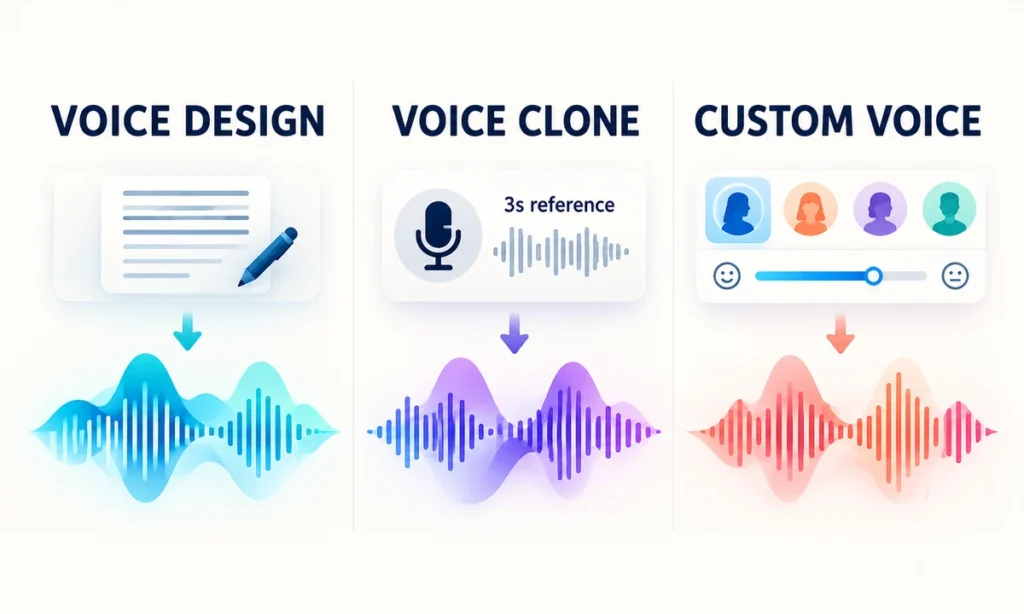
The three main voice options solve different problems. Choosing the right one prevents a common mistake: expecting a voice-design model to clone a specific person or assuming every preset-voice model accepts open-ended cloning instructions.
Voice design from a description
The Qwen3-TTS-12Hz-1.7B-VoiceDesign model lets you describe the kind of speaker you want. Rather than uploading someone’s voice, you might request a warm adult narrator with measured pacing, a light American accent, and a friendly but professional tone.
This is useful for fictional characters, course narrators, and prototypes where you want a consistent style without imitating a real person. Results may still need several attempts because descriptions such as “warm” or “confident” are open to interpretation.
Custom voices from preset options
The CustomVoice models use a collection of predefined timbres. The open release lists nine preset voices, with additional style instructions supported by the 1.7B CustomVoice variant. That can be more convenient than describing a new voice for every short script.
For a weekly tutorial series, pick a voice that matches your brand and keep the wording and pacing consistent. Listen for difficult names, technical terms, and unusual abbreviations before reusing a generated voice-over.
Voice cloning using a short recording
The Base models, available in 0.6B and 1.7B sizes, support rapid voice cloning with a reference recording of about three seconds. The system uses that sample as guidance when generating new speech. A longer, clean sample or additional adjustments may still be necessary to get satisfactory results in practice.
Only clone a voice when you have the speaker’s clear permission and rights to use the recording. A technically convincing imitation can mislead listeners, especially if it sounds like a colleague, customer, celebrity, or family member. Avoid publishing synthetic speech as if the real speaker recorded it.
How to Try Qwen3-TTS
You don’t have to start by installing a model on your computer. The official project links to demonstration pages, while developers can work with the downloadable models or Alibaba’s API offerings. Available controls, login requirements, and usage limits depend on the service you choose.
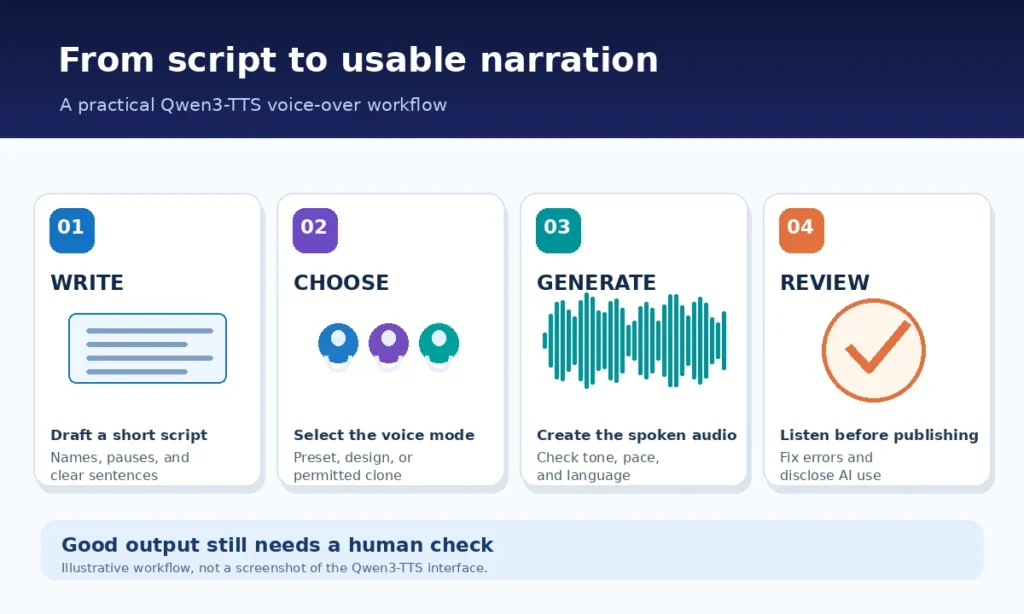
- Open the official project. Visit the Qwen3-TTS GitHub repository and follow its Hugging Face Demo or ModelScope Demo link. This helps you avoid confusing the original project with unrelated websites using similar names.
- Choose the task. Select a preset voice for straightforward narration, VoiceDesign for a new voice described in words, or a Base voice-cloning option if you have a permitted reference recording.
- Write a short test script. Start with two or three sentences. Include an abbreviation, a question, and a natural pause if they represent your real material.
- Add delivery instructions where supported. Describe the intended tone and pace in plain English. For example, ask for a calm educational delivery with clear pronunciation and brief pauses between instructions.
- Generate and listen. Check for missing words, names pronounced incorrectly, unexpected pauses, and emotional delivery that does not fit the subject.
- Revise before exporting. Shorten awkward sentences, spell out tricky abbreviations, or divide a long script into smaller sections. Export only after reviewing the audio and the service’s usage terms.
A simple starter script might read: “Welcome to our beginner’s guide. Today we’ll explain how solar panels work and what affects their output. Let’s start with the basics.” For a more natural result, compare one neutral read with a second generation instructed to sound relaxed and conversational.
Three useful voice-style instructions
Educational tutorial: “Speak in clear American English at a measured pace. Sound friendly and well informed. Pause briefly between numbered steps. Avoid dramatic emphasis.”
Bedtime story: “Use a soft, gentle storytelling tone with unhurried pacing. Keep the delivery warm and expressive without sounding theatrical.”
Short product explainer: “Use a confident, approachable voice with a steady rhythm. Give the key benefit a little emphasis, but avoid sounding like an aggressive sales ad.”
The controls shown in a particular demo may not accept all these instructions. If an interface offers only a voice picker and text box, choose the closest preset or try the supported VoiceDesign mode instead.
Where Can Qwen3-TTS Be Useful?
Video narration and social media
YouTube tutorials, short explainers, product demonstrations, and captioned videos often need consistent narration. Qwen3-TTS can generate an initial voice-over when a creator cannot record in a quiet space or wants to test different script versions before hiring talent.
Audio quality alone does not make a good video. You still need accurate information, suitable visuals, editing, and a script written for listeners. For visual ideas to pair with a narrated video, see our Nano Banana image prompt examples.
Learning materials and accessibility
Teachers and training teams can turn written lessons into spoken study material, including pronunciation practice or an audio version of a guide. Multiple language options may help with multilingual content, although translations must be prepared or checked separately. Qwen3-TTS generates speech. It is not automatically a reliable translation or fact-checking system.
For accessibility, make sure audio versions remain accurate and that text transcripts or captions are also available. Some listeners will prefer written content, and others will need additional ways to navigate long recordings.
Interactive apps and customer experiences
Streaming speech matters when someone is interacting with a voice-enabled assistant. Instead of waiting for a long audio file, an application can begin playback as speech arrives. Developers still need to manage the rest of the system, including recognition of spoken questions, response generation, moderation, networking, and user privacy.
If you are exploring automated workflows, our guide to building an n8n AI agent with Google Sheets explains how AI systems can process inputs and pass results between tools. Qwen3-TTS would require its own supported integration or API setup for speech output. The n8n tutorial does not itself provide that integration.
Is Qwen3-TTS Free and Open Source?
The released Qwen3-TTS models and code are available under the Apache 2.0 license, according to the project’s repository and technical report. That matters to developers who want to inspect, modify, or run the published models themselves, subject to the license and other applicable obligations.
But open-source model availability is not the same as free hosted speech generation. Cloud APIs may charge for requests, demos may impose quotas, and running a model locally requires suitable hardware, storage, and technical setup. Check the specific service’s current pricing and policies before planning a production workflow.
The 0.6B variants are generally the lighter option, while the 1.7B versions offer more capacity or control depending on the model. Smaller does not automatically mean fast enough for every machine, and a larger model does not guarantee that every spoken sentence will sound better.
Limitations and Risks Worth Knowing
The original launch announcement makes ambitious claims, but a useful review should separate advertised capabilities from everyday results. Here are the practical checks that matter most.
- Pronunciation can still be wrong. Names, acronyms, uncommon places, specialized vocabulary, and mixed-language text may need editing or phonetic guidance.
- Emotion can miss the mark. Voice instructions can influence delivery, but they do not guarantee an authentic performance or consistent tone across a long audiobook.
- Cloning is not perfect identity preservation. Three seconds of sample audio can enable cloning, but noise, accent, recording quality, and the target script affect results.
- Low latency depends on the setup. The advertised 97 ms result should not be treated as an end-to-end speed guarantee for a public website or personal computer.
- Long-form work needs review. Segmenting, checking pronunciation, and joining audio cleanly can take time. Human narration may still be preferable for sensitive or emotionally demanding content.
- Voice privacy matters. Upload recordings only when you have permission. Read the host’s retention and data-use terms before sending private audio to an online demo.
For business use, establish a review process before a synthetic voice is published. Make sure listeners are not misled about who is speaking, and verify any rights or disclosure rules that apply to your location and distribution platform.
Qwen3-TTS vs. Basic Text-to-Speech Software
A basic TTS tool may be all you need to read a short web page aloud. You choose a voice, press play, and receive understandable speech. If that already works for your audience, you may not benefit from extra configuration.
Qwen3-TTS becomes more interesting when you need the specific capabilities it offers: model-based voice design, custom timbres, permitted voice cloning, language selection, or streaming generation inside an application. Its open release also gives developers more deployment flexibility than a service available only through a closed interface.
It is not automatically a better option than every paid voice service. Evaluate several samples using your actual script, target language, and publishing workflow. Compare naturalness, pronunciation, control, cost, latency, privacy, and the time needed to fix mistakes rather than relying on promotional demos alone.
Frequently Asked Questions
Is Qwen TTS the same as Qwen3-TTS?
“Qwen TTS” can refer generally to the Qwen team’s text-to-speech technology. Qwen3-TTS is the named model family discussed here, including released voice-design, custom-voice, and voice-cloning variants.
Which languages does Qwen3-TTS support?
The January 2026 open release lists Chinese, English, Japanese, Korean, German, French, Russian, Portuguese, Spanish, and Italian. Some products in the wider Qwen speech line may offer different voices or dialect options, so check the specific model rather than assuming every version is identical.
Can Qwen3-TTS clone a voice from just three seconds?
The Base models support voice cloning from approximately three seconds of reference audio, according to Qwen. That is a capability description, not a promise of flawless results. Use only recordings you have permission to use.
What does 97 ms latency mean?
Qwen reports a first-audio-packet synthesis latency as low as 97 milliseconds in its optimized streaming setup. It is not the duration needed to produce an entire recording, and real performance varies by hardware, network, text, and deployment.
Can I use Qwen3-TTS for YouTube videos commercially?
The released model code and weights use Apache 2.0 licensing, but your rights also depend on the source material, the hosting service’s terms, permissions for any cloned voice, and applicable rules. Check those before publishing or monetizing an audio track.
Do I need coding skills to use Qwen3-TTS?
Not necessarily. An official demo can let you explore supported options through a web interface. Installing and serving the open models, connecting an API, or building a real-time voice application usually requires more technical knowledge.
Final Thoughts
Qwen3-TTS gives creators and developers several ways to turn text into speech, from straightforward narration to voice design and consent-based cloning. Its January 2026 open-source release made those capabilities available in downloadable models, with ten supported languages and streaming features that are useful for interactive applications.
The most practical next step is to test a short script in the official demo, listen carefully, and choose the model that matches your actual need. Good AI voice work still depends on clear writing, careful review, permission to use any reference voice, and an honest presentation of synthetic audio.
Official Sources and Further Reading
Qwen3-TTS technical report (arXiv, January 2026)
Qwen team: Qwen3-TTS open-source announcement (January 21, 2026)