
You’ve finished the project, sent the files, and moved on to the next job. Then your client writes back asking which invoice they’re supposed to pay, why the amount is different from the quote, or where to find your payment details. Suddenly, collecting payment has become another round of admin work.
A clear invoice won’t guarantee that a client pays on time. But it can remove avoidable questions and make it much easier for both sides to understand what was delivered, what is owed, and when payment is expected.
This freelance invoice checklist covers the information an invoice should include, how to set payment terms, and how to keep a useful record after sending it. It also includes a complete example you can adapt without buying specialized software.
Table of Contents
Freelance Invoice Checklist at a Glance
Use this checklist before sending each invoice. Some items are good business practice, while others may be required by law or contract depending on where you operate and where your client is based.
| Item | What to verify |
|---|---|
| Your business details | Correct name, business address or required contact details |
| Client details | Correct legal or billing name and address if needed |
| Unique invoice number | Not reused for another invoice |
| Issue date | The date the invoice is created |
| Due date and terms | A specific payment deadline or agreed terms |
| Description of work | Clear services, period, deliverable, or milestone |
| Quantity or hours | Matches the approved agreement |
| Rate or price | Agreed hourly rate, fixed fee, or unit price |
| Subtotal and adjustments | Discounts and applicable charges stated clearly |
| Taxes, if applicable | Correct treatment under relevant rules |
| Total and currency | Amount payable is obvious |
| Payment instructions | Approved method and correct receiving details |
| Reference | Project name or purchase order if required |
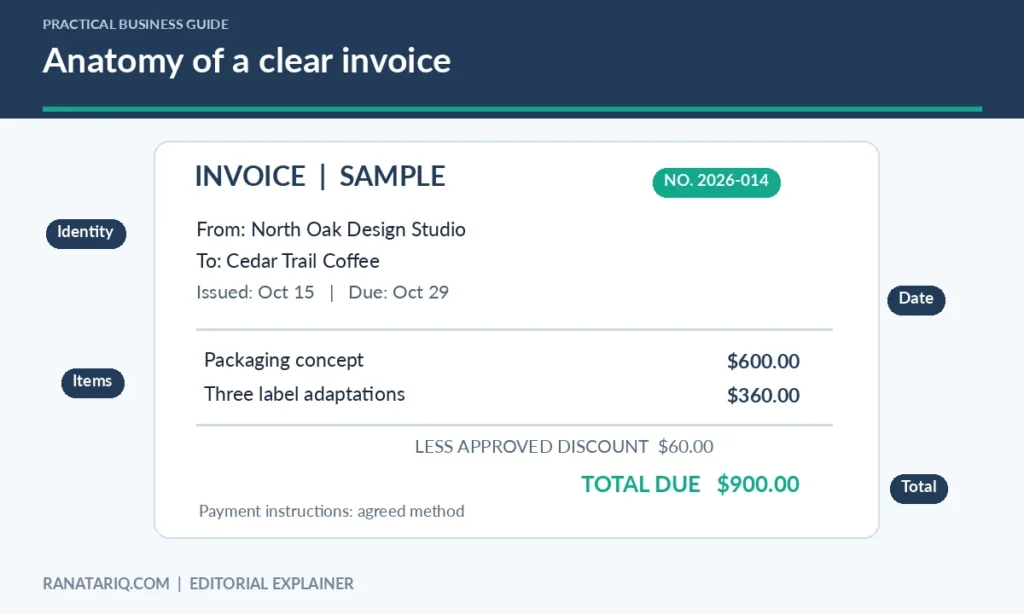
Before you send it, compare the invoice with the proposal, purchase order, or contract. The invoice is a request for payment, not a place to introduce charges the client never agreed to.
What Information Should a Freelance Invoice Include?
Your name and business identity
Use the professional name under which the client hired you. That may be your own name or a registered business name. Include the business details your client needs for payment processing and recordkeeping, but don’t publish unnecessary personal information.
If your location requires a tax registration number or particular wording, add it according to those rules. Requirements vary by jurisdiction, so a generic internet template isn’t a substitute for local tax guidance.
The client’s billing information
Ask which name and address should appear on the invoice, especially when you’re working with a company rather than an individual. Larger clients may require a purchase order number, department name, vendor ID, or other internal reference.
Getting this information before the project ends can prevent the invoice from being rejected by the client’s accounts payable system. It also avoids changing a settled invoice later just to fix a billing label.
A unique invoice number
Give each invoice its own identifier, such as 2026-001 or CLIENT-1042. Choose a consistent numbering system and avoid reusing numbers, even if an invoice is canceled. When you revise a document, keep a clear record of the original and updated version.
Your numbering system doesn’t have to be complicated. It simply needs to make an invoice easy to find when a client asks a question or when you reconcile payments.
Issue date, due date, and payment terms
The issue date records when you created the invoice. The due date tells the client when you expect payment. Terms such as “Net 14” can be useful, but writing the actual due date alongside the term removes ambiguity.
Use whatever terms were agreed in your contract. Don’t add a late fee or change the deadline after the work is finished unless the agreement and applicable law permit it.
A description that matches the work
Avoid an unhelpful line such as “design work” when the client has commissioned several projects. Write a short description that identifies the deliverable or service period.
For example, “Three product-page layouts and one revision round, September 2026” is easier to understand than “website services.” You don’t need to copy the entire scope of work, only enough detail to connect the charge to the agreement.
Prices, taxes, and total
List quantities, hourly rates, or fixed fees in a format the client can check. Show the subtotal, any approved discount, the applicable tax amount if required, and the final total in the correct currency.
Tax rules aren’t universal. Whether you need to charge sales tax, VAT, GST, or another tax depends on the transaction and jurisdiction. Confirm your obligations with an appropriate tax professional or official authority when necessary.
Payment instructions
Provide a method the client can use safely. You might link to a hosted payment page or include business banking details if appropriate. Confirm any payment account information from your own records before adding it.
Be alert to invoice fraud. If a payment account changes, use an independently verified channel to notify the client. Don’t assume that a last-minute email requesting new bank details is legitimate.
Freelance Invoice Example With Realistic Sample Figures
The example below uses fictional people, a fictional company, and illustrative amounts. It demonstrates layout and arithmetic, not tax advice.
Invoice: STUDIO-2026-014
Issued: October 15, 2026
Due: October 29, 2026
From: North Oak Design Studio
Bill to: Cedar Trail Coffee, Accounts Payable
Project: Packaging refresh
| Description | Qty | Rate | Amount |
|---|---|---|---|
| Packaging concept development | 1 | $600.00 | $600.00 |
| Product label adaptation | 3 | $120.00 | $360.00 |
| Subtotal | $960.00 | ||
| Approved project discount | -$60.00 | ||
| Total before any applicable tax | $900.00 |
Payment terms: Payment due October 29, 2026, by the agreed method listed in the client’s onboarding details.
Reference: Packaging refresh, approved proposal dated September 30, 2026.
The arithmetic is straightforward, but the line-item explanation is what helps the client recognize the charge. If tax is required, show it separately and calculate the final payable amount accordingly.
When Should You Send an Invoice?
Follow the payment schedule in your contract. For some freelancers, that means a deposit before work begins and a final invoice after delivery. For others, it means monthly billing or an invoice when a milestone is accepted.
It’s usually easier to invoice promptly after an agreed milestone than to reconstruct what happened months later. Set aside a regular time to check which projects are ready for billing and which invoices are awaiting payment.
If you invoice monthly, use a cutoff date and make sure all work during that period is accounted for. A short billing standard operating procedure can help, especially if someone else prepares invoices for you.
What to Do After Sending the Invoice
Sending an invoice isn’t the end of the process. Save the version you sent and record the invoice number, client, issue date, due date, amount, and current status.
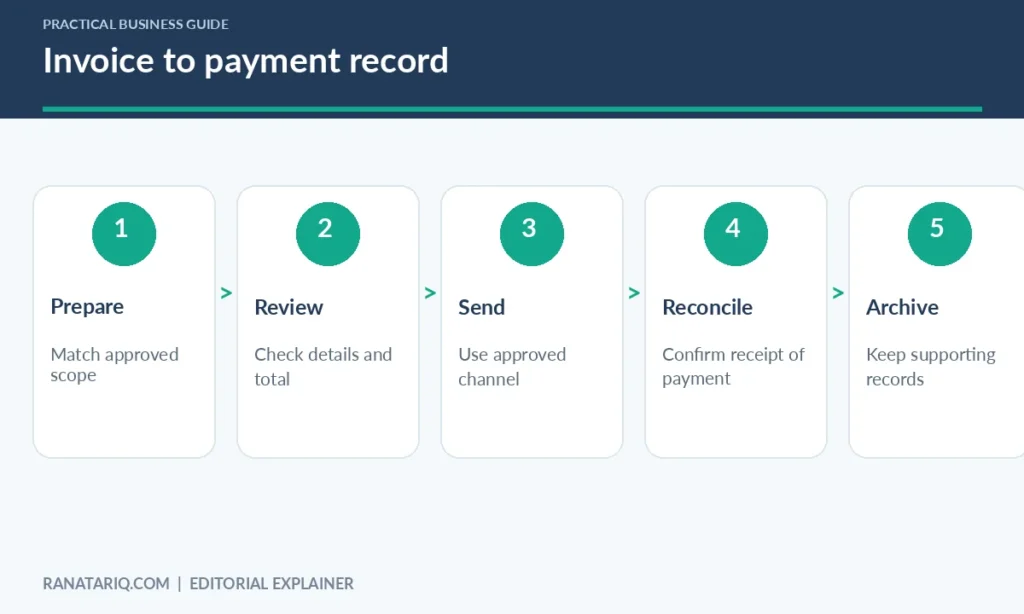
When payment arrives, match it to the invoice, record the date, and note any payment fees or differences. Keep the supporting contract or agreement, proof of delivery, and related receipts in an organized place.
The IRS guidance on business recordkeeping describes invoices among the supporting documents businesses may need for income and expense records. Its transaction-recording guidance also explains that electronic systems must maintain accurate, accessible records.
The exact record retention period can depend on your circumstances, so consult applicable official guidance rather than relying on a single fixed number.
A simple invoice tracker
A small spreadsheet can work well at the beginning. Use columns for invoice number, client, amount, issue date, due date, date paid, and status. Filter regularly for overdue invoices and verify payment records before sending reminders.
If a client has already paid, an automatic reminder can be irritating and confusing. Reconcile your records first, then send a polite follow-up that includes the invoice reference and a request to confirm the payment status.
Spreadsheet, Word Template, or Invoicing Software?
A document template is fine when you send occasional invoices and can track payments reliably. A spreadsheet adds basic reporting and overdue filters. Invoicing software may help when you have recurring billing, multiple clients, payment links, or several currencies.
The right choice depends on how much work you spend creating invoices and reconciling payments. Pay attention to exports, payment fees, tax configuration, client access, and what records you retain if you stop using the service.
Don’t choose software only because it promises a professional-looking invoice. Accuracy, agreed terms, safe payment instructions, and orderly records matter more than decorative formatting.
Common Freelance Invoice Mistakes
One mistake is sending an invoice without a due date. Another is using a broad description that forces the client to ask what the charge covers. Both can delay internal review even when the amount is correct.
Double-check currency symbols, taxes, discount calculations, and any deposits already paid. If a deposit must be credited against the final amount, show that clearly instead of requesting the full fee again.
Protect sensitive payment information and avoid sending unnecessary personal identifiers. Store records in a backed-up location with appropriate access controls, especially if you work with clients whose files contain private information.
Frequently Asked Questions
Do freelancers need invoice numbers?
Unique numbers are a practical way to track payments and records, and some jurisdictions require particular numbering practices. Check the rules that apply to your business.
Can I invoice without registered business software?
Yes, many freelancers can create invoices using a document or spreadsheet. What matters is that the invoice meets your legal and contractual obligations and your records are accurate.
Should I add sales tax to a freelance invoice?
Only when required by the rules that apply to the transaction. Tax treatment depends on your location, the client, and the service provided. Confirm this with official guidance or a qualified adviser.
What if a client asks me to change an invoice?
Check what needs correcting, keep a record of the original, and issue a corrected document according to applicable rules. Do not quietly overwrite a paid invoice in your records.
What should I do if a client pays late?
First confirm that payment hasn’t been received. Then send a clear, polite reminder with the invoice number, original due date, and a secure way to pay. Follow the contract and applicable law for any further action.
Final Thoughts
A useful freelance invoice checklist is a small safeguard against big administrative frustrations. Include accurate identities, a unique reference, clear work descriptions, agreed terms, correct calculations, and reliable payment instructions.
Just as importantly, track what happens after you send the invoice. Consistent records and prompt reconciliation will help you answer client questions and understand your cash flow without searching through old emails.