
You want to automate a task that takes up too much of your day. Maybe you’re copying information between apps, answering customer questions, or checking documents before approving a request. Should you build a regular automation workflow or let an AI agent handle it?
The debate around AI agents vs traditional automation comes down to one important difference. Traditional automation follows instructions and decision rules you’ve defined in advance. AI agents can interpret information, choose tools, and decide what to do next while working toward a goal.
That doesn’t make AI agents the better option for every job. A simple workflow can be faster to build, easier to check, and more dependable when the task rarely changes.
Here’s how both approaches work, where each makes sense, and how to decide without adding unnecessary complexity.
Table of Contents
AI Agents vs Traditional Automation in Plain English
The easiest way to understand the difference is to look at who decides what happens next.
In traditional automation, the developer defines the steps and decision rules. In an AI agent, an AI model can select actions and tools based on the task and information it receives.
For example, imagine an online store receives a customer email asking about a delayed order.
A traditional workflow might check the order status and send a specific email based on the result. An AI agent could read the customer’s message, look up the order, inspect the tracking information, and decide whether to ask a question, draft a response, or refer the problem to support staff.
Both approaches automate work. They simply handle decisions differently.
| Feature | Traditional automation | AI agents |
|---|---|---|
| How decisions happen | Defined rules and conditions | Model-driven decisions within configured limits |
| Workflow steps | Mostly predefined | Can change based on the task |
| Best inputs | Structured, predictable information | Natural language and variable information |
| Handling exceptions | Uses programmed branches or escalation | Can investigate and adapt using available tools |
| Output consistency | Generally more predictable for fixed tasks | Can vary between similar requests |
| Costs | Often easier to estimate for stable workflows | Depends on model usage, tool calls, and review |
| Main concern | Maintaining rules and handling unexpected cases | Accuracy, permissions, and unpredictable behavior |
There’s an important detail here. Traditional workflows aren’t necessarily primitive or inflexible. They can contain complex conditions, loops, integrations, and error handling. The distinction is whether those decisions follow defined logic or are dynamically directed by a model.
This is also how Anthropic explains the difference between workflows and agents.
What Is Traditional Automation?
Traditional automation uses software to complete tasks according to predefined instructions. A trigger starts the process, and the system performs actions based on its configured rules.
Consider a business that receives online orders. When an order is paid, an automation can record it in a spreadsheet, update inventory, and send a confirmation email.
The workflow could follow these steps.
- A new paid order triggers the workflow.
- The system retrieves the order details.
- Inventory records are updated.
- An email confirmation is sent.
- The workflow records whether the actions succeeded.
The business doesn’t need an AI agent to make these decisions. Every step has a clear purpose, and the system knows what conditions to check.
Traditional automation can also branch. If inventory is unavailable, the workflow might notify the warehouse instead of sending the usual confirmation.
Tools such as n8n, Zapier, and AWS Step Functions can be used to create automated workflows, although their capabilities and intended users differ.
Where traditional automation works best
Traditional automation is particularly useful when a task has clear inputs, repeatable actions, and well-defined outcomes.
For example, a small business could use it to send appointment reminders, move new leads into a CRM, generate scheduled reports, or create invoices when certain conditions are met.
These jobs don’t usually require the system to interpret complicated requests or invent a new sequence of actions. The goal is to complete the same process consistently.
The limitation appears when the number of exceptions grows. If every unusual situation requires another rule, the workflow can become difficult to maintain.
What Is an AI Agent?
An AI agent is a software system that uses an AI model to decide how to complete a task, often by accessing information and using external tools.
Instead of following one fixed sequence, an agent can choose different actions as the task develops. It may search for information, call an API, examine a file, compare results, or ask for clarification before continuing.
A typical agent works through a cycle.
- Receive a task or goal.
- Examine the available information.
- Decide which action or tool to use.
- Perform the action and inspect the result.
- Continue, change direction, or stop based on the outcome.
Suppose you ask an agent to investigate why several customer orders are marked as delivered but have unresolved support tickets.
The agent might retrieve those orders, compare shipping records, read customer messages, identify common issues, and prepare a report. It could take different investigative steps for different orders rather than using exactly the same path each time.
This is the kind of model-directed workflow described in OpenAI’s practical guide to building AI agents.
However, autonomy should not mean unlimited access. An agent can operate within strict permissions, tool restrictions, spending limits, and approval requirements.
Does using AI automatically make something an agent?
No. Adding a language model to a workflow doesn’t automatically turn it into an AI agent.
Imagine an automation that sends each customer review to an AI model for sentiment classification. The model returns positive, neutral, or negative, and the workflow saves that classification in a spreadsheet.
AI is involved, but the sequence remains predefined. The model isn’t choosing which tools to use or controlling the workflow.
Now imagine the model can independently decide whether to look up a customer history, check a delivery record, or request missing information before recommending the next action.
That second design is closer to an AI agent because the model has a meaningful role in directing the work.
Three Real-World Examples That Show the Difference
The differences become easier to see when both approaches tackle the same business problem.
Example 1 – Handling customer refund requests
An online store receives a message from a customer whose product arrived damaged.
With traditional automation, the store could create rules based on the purchase date, order status, return window, and refund amount. If a request meets the conditions, the workflow can process it or send it to an employee for approval.
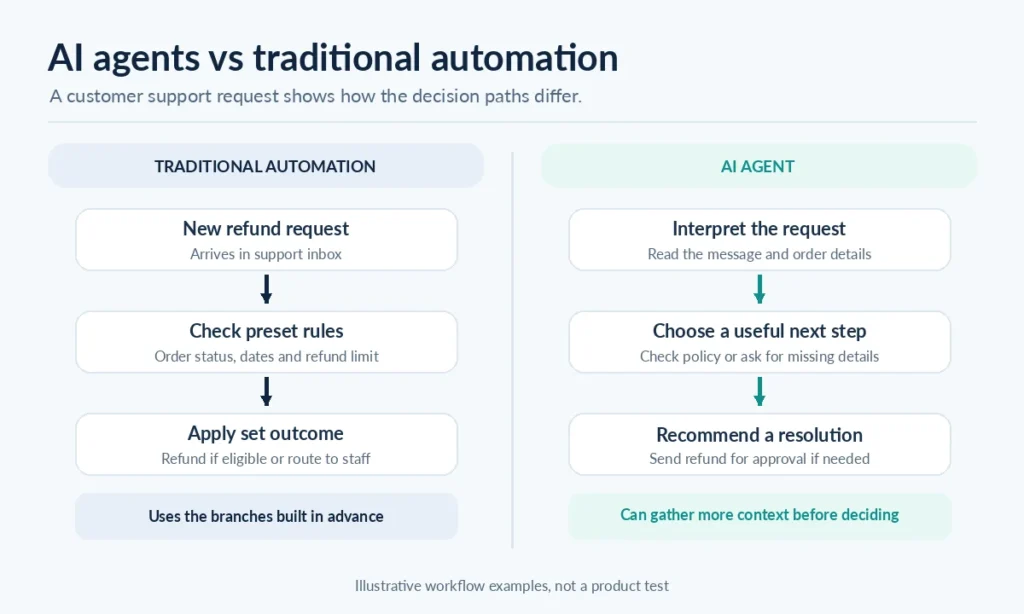
This works well for straightforward cases.
But what happens when the customer says the product arrived damaged, the delivery tracking looks normal, and they would prefer a replacement unless it takes too long?
An AI agent could interpret those details, check the order, retrieve the return policy, and ask about replacement availability. It could then prepare a suitable response or recommend an exception for an employee to review.
The advantage is flexibility when handling unusual requests. The risk is that the agent may misunderstand a policy or make an unsupported recommendation.
For that reason, sensitive actions such as issuing substantial refunds should remain subject to explicit rules or human approval.
Example 2 – Preparing a weekly sales report
Suppose a manager wants a sales summary emailed every Monday morning.
If the data is already structured and the report format rarely changes, traditional automation is an obvious choice. It can collect figures, calculate totals, populate a template, and deliver the report on schedule.
An AI agent adds little value when the task consists mainly of moving and calculating known data.
Now imagine the manager also wants an explanation for unexpected changes. The system may need to investigate unusual orders, review customer feedback, and compare several information sources.
An AI-assisted workflow could prepare an explanation, while an agent may be useful if the investigation requires choosing which sources to examine.
The best design could combine both. Traditional automation handles the schedule and calculations, while AI assists with interpreting the findings.
Example 3 – Reviewing incoming business documents
A company receives invoices from several suppliers. Each invoice contains a supplier name, invoice number, payment amount, and due date, but the layouts are different.
A traditional workflow can validate extracted fields, check purchase order references, and send approved records into accounting software.
AI may help read inconsistent document layouts. That doesn’t necessarily require a full agent because the remaining steps may still be fixed.
An agent becomes more useful when a document contains conflicting information and the system needs to decide what to investigate. It might retrieve a purchase order, compare invoice details, check a supplier record, and flag the discrepancy.
Even then, the actual payment approval can remain outside the agent’s control.
The important question isn’t whether AI can perform the task. It’s whether giving the model control over additional decisions improves the result enough to justify the extra complexity.
When Should You Use Traditional Automation?
Choose traditional automation when you can describe the task as a reliable sequence of actions and conditions.
It’s generally a strong fit for:
- Moving information between business applications
- Sending reminders and notifications
- Updating spreadsheets or databases from structured records
- Applying clearly defined eligibility rules
- Running scheduled reports and backups
- Creating routine documents from approved templates
Consider whether you could explain every important decision with a short set of rules.
If you can, and those rules don’t change often, building an agent may be unnecessary.
Traditional automation also offers advantages for work that requires a clear record of how decisions were made. The programmed rules can be reviewed, tested, and updated directly.
That doesn’t guarantee an automation will never fail. APIs change, records contain errors, and unexpected conditions still occur. But identifying what the workflow was supposed to do is often more straightforward.
When Should You Use an AI Agent?
An AI agent becomes worth considering when the system needs to interpret a situation and choose among several possible actions.
Good candidates often involve unstructured information, changing conditions, and tasks where the correct next step isn’t always obvious.
Examples include investigating complicated customer questions, researching information across multiple documents, diagnosing technical problems, and reviewing unusual business cases.
An agent may also help when a traditional rules engine has become difficult to maintain because it needs too many exceptions.
Still, a task should have a clear goal and a way to judge whether the result is correct. Simply telling an agent to “manage the business” gives it too much ambiguity and makes performance difficult to evaluate.
An agent should know what successful completion looks like, which tools it can use, what it must never do, and when it needs human help.
Why Combining AI Agents and Traditional Automation Often Works Better
You don’t have to choose one approach for your entire business.
A hybrid system can use traditional automation for predictable steps and AI for the parts that require interpretation or judgment.
Imagine a customer service workflow built in n8n.
A new customer email triggers the workflow. An AI model reads the message and identifies the issue. Defined business rules determine which actions are allowed, and an employee reviews any sensitive request.
For a straightforward inquiry, the automation might send an approved response. For a complicated case, an AI agent could be given access to order information and support policies so it can investigate before recommending a solution.
The surrounding workflow still controls permissions, routing, and recordkeeping.
n8n supports this kind of design through its AI Agent node, which connects an agent to a chat model and tools.
This separation is useful because not every step benefits from AI. You can reserve model-driven decisions for tasks where they provide a practical advantage, while keeping routine and sensitive operations under predictable controls.
Building an n8n AI agent with Google Sheets
Are AI Agents More Expensive Than Traditional Automation?
AI agents can cost more to operate, but there isn’t a universal answer.
The total cost depends on the number of tasks, model usage, tool calls, infrastructure, employee review, and the time spent maintaining the system.
A traditional automation platform might charge for workflow executions or tasks. An agent-based system may also consume model tokens, retrieve information, make repeated tool calls, and require additional monitoring.
A complicated traditional workflow can also become expensive if every new exception requires more development and maintenance.
Before choosing an approach, compare the full cost of getting a task completed correctly.
| Cost factor | What to consider |
|---|---|
| Initial setup | Building, connecting, and testing the system |
| Running costs | Workflow executions, API calls, and AI model usage |
| Maintenance | Updating rules, prompts, tools, and integrations |
| Human review | Time spent approving or correcting results |
| Error recovery | Finding and fixing failed or incorrect actions |
| Monitoring | Logging, security checks, and performance evaluation |
For simple, high-volume tasks, traditional automation is often easier to justify.
For complicated tasks that currently require a significant amount of human investigation, an agent may be worth testing. The benefit needs to be demonstrated with results from your own workflow rather than assumed from a product demonstration.
What Are the Risks of Using AI Agents?
AI agents introduce risks that are easier to overlook when a demonstration appears to work smoothly.
One concern is incorrect decision-making. An agent may misunderstand a request, overlook a policy restriction, or take the wrong action based on incomplete information.
Another is security. If an agent can access files, emails, databases, and administrative tools, poorly designed permissions can turn one mistake into a larger problem.
The OWASP guidance on Excessive Agency highlights risks created when language-model systems have more functionality, permissions, or autonomy than necessary.
Prompt injection is another concern. Instructions hidden in a document, email, or web page can attempt to influence the agent’s actions.
A sensible implementation should include these safeguards.
- Give each agent access only to the tools and data it needs.
- Require approval before payments, deletions, refunds, or other high-impact actions.
- Validate data and enforce business rules outside the model.
- Keep logs of tool calls, decisions, failures, and approvals.
- Set limits on how long an agent can run and how many actions it can take.
- Test unusual, incomplete, and malicious inputs before deployment.
Human review matters most when a mistake could create a financial, legal, privacy, or safety problem.
And remember that human approval isn’t automatically effective. The reviewer needs enough reliable information to understand and challenge the proposed action.
How to Choose Between an AI Agent and Traditional Automation
You don’t need to start with a complicated system design. Start by examining the task you actually want to improve.
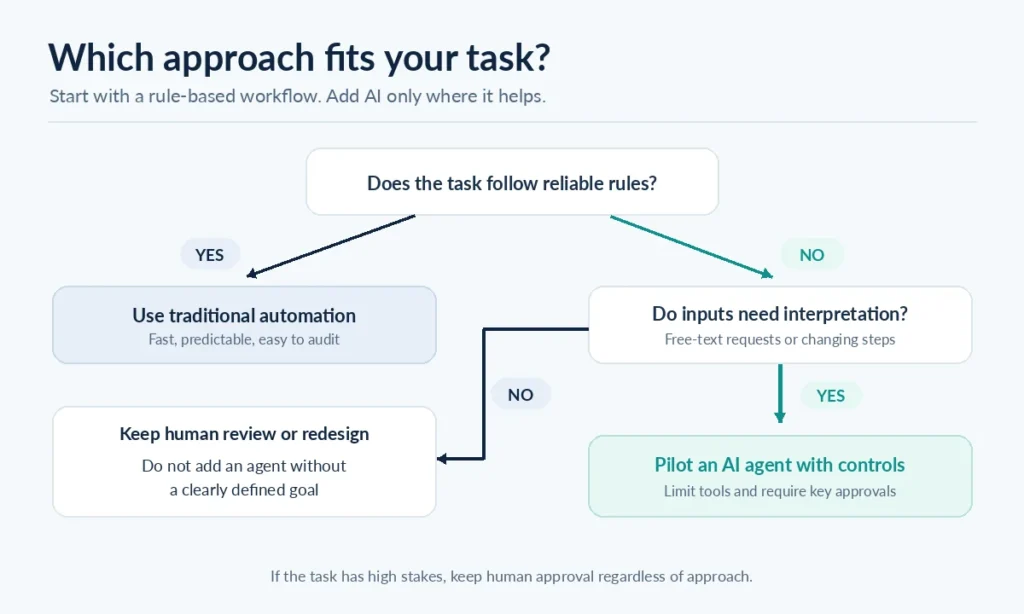
1. Check how predictable the task is
Write down the trigger, required information, decisions, and desired outcome.
If the process follows stable rules, begin with traditional automation. If the necessary steps change significantly depending on the situation, investigate whether an agent would help.
2. Look at the information the system must handle
Structured information, such as order IDs, dates, prices, and status fields, is usually easier to handle with standard workflows.
Emails, open-ended requests, mixed documents, and ambiguous instructions may benefit from AI interpretation. But an AI extraction or classification step may be sufficient without handing over control of the whole process.
3. Decide how much independence is appropriate
Ask what the system is allowed to do without permission.
Reading files and preparing a draft are different from deleting records or issuing payments. The more serious the consequences, the stronger the need for explicit controls and review.
4. Test the simplest version first
Build a small workflow and test it on a representative set of realistic tasks, including unusual cases.
If a rules-based process handles the work reliably, there’s no need to replace it merely because agents are available. If the process repeatedly fails on cases that require interpretation, test a limited AI step or agent.
5. Measure results before expanding
Track whether the task was completed correctly, how much employee attention it needed, how often it failed, and what it cost.
For agents, also examine tool usage, unnecessary actions, and how often the system needed to escalate to a person.
The decision should be based on outcomes you can observe, not how impressive the workflow looks.
Common Mistakes to Avoid
One common mistake is using an AI agent for a problem that only needs a trigger and a few conditions. This creates additional cost and makes behavior harder to predict without solving a meaningful problem.
Another is treating an agent as if it will always understand company policies correctly. A language model can help interpret information, but important restrictions still need enforcement through software and appropriate approval steps.
It’s also easy to give an agent too many tools at once. Begin with a narrow task and limited permissions, then expand only after you’ve tested its behavior.
Finally, don’t confuse a successful demonstration with a reliable production workflow. Real requests include missing fields, duplicate records, conflicting information, expired credentials, and situations that weren’t part of the initial test.
A useful automation system needs to handle those cases, or recognize when it cannot.
Frequently Asked Questions
Are AI agents better than traditional automation?
Not always. AI agents are useful when tasks require flexible decisions, investigation, or interpretation, while traditional automation is often a better fit for predictable work. The right choice depends on the task, acceptable risk, and total operating cost.
Can AI agents replace traditional automation?
AI agents can replace some fixed workflows, particularly those with complicated decision-making requirements. But predefined automation remains valuable for routine operations, strict business rules, and actions where consistency is important. Many systems benefit from combining both.
Is ChatGPT an AI agent?
A standard chat interaction with ChatGPT isn’t necessarily an AI agent. An agentic system typically gives an AI model responsibility for directing a task and selecting tools or actions. Whether a particular ChatGPT workflow qualifies depends on what it can do and how it operates.
Can I build AI agents with n8n?
Yes. n8n has an AI Agent node that can connect to a language model and external tools. It can be placed within a broader workflow, allowing you to combine model-driven decisions with predefined triggers and actions.
Do I need coding skills to build AI agents?
Not always. Visual automation platforms can make simple agent workflows accessible without extensive programming. However, reliable production systems still require an understanding of permissions, error handling, data validation, testing, and integrations.
What is the difference between an AI agent and an AI workflow?
An AI workflow can include AI model calls while following a predetermined sequence of steps. An AI agent gives the model more control over choosing actions and directing the task. The distinction is about control of the process, not simply whether AI is present.
Final Thoughts
The choice between AI agents and traditional automation shouldn’t begin with the technology. It should begin with the problem you’re trying to solve.
If the steps are clear, the rules are stable, and the desired result is predictable, traditional automation is usually the sensible starting point.
When a task requires interpreting messy information, investigating exceptions, or choosing among different actions, an AI agent may offer something a fixed workflow cannot easily provide. That flexibility comes with additional responsibility for testing, security, and oversight.
For many businesses, the strongest solution will be a combination of both approaches.
If you’re exploring practical applications, the Practical AI guides on RanaTariq.com cover more ways to put AI tools and automation to work.